adsyncs
Free Trial
Solutions · Google Ads

Google Ads, run from a chat window.

Adsyncs gives Claude a direct line to your Google Ads. Audit campaigns, mine search terms, propose changes, all in chat. You approve.

Ask a question. Get a real answer from your live account.

No exports, no copy-paste from Editor. Ask in plain English and Claude reads your live account, diagnosing the change and proposing the fix.

Three things every Google Ads team does the hard way.

Search-term waste that lives till Friday

$200 leaks on a Tuesday from zero-conversion queries no one spots. The weekly review catches it. The mid-week leak goes unnoticed.

Diagnosis that takes longer than the fix

Every anomaly is a trip through Editor, four reports, and a spreadsheet. By the time you know what broke, the next thing has already broken.

Optimization that lands late

By the time a slowdown shows up in a dashboard, it has already cost real money. The fix is fast. The time to spot it is not.

google_ads.morning_briefingCaldera · 3 anomalies, 08:14
Brand campaignImpression share dropped 18% in the last 24h
Investigate
Search · zero-conv terms$182.40 spent on 3 search terms with 0 conv. in last 7d
Stage negatives
Promo campaignPacing at 142%, daily budget exhausts by 14:00
Reallocate budget
What Claude does for your Google Ads

Six things Claude does for you, every day.

Connect your account once and Claude picks up six built-in capabilities. It reads the campaign, suggests the move, and waits for you to approve.

Browse all tools
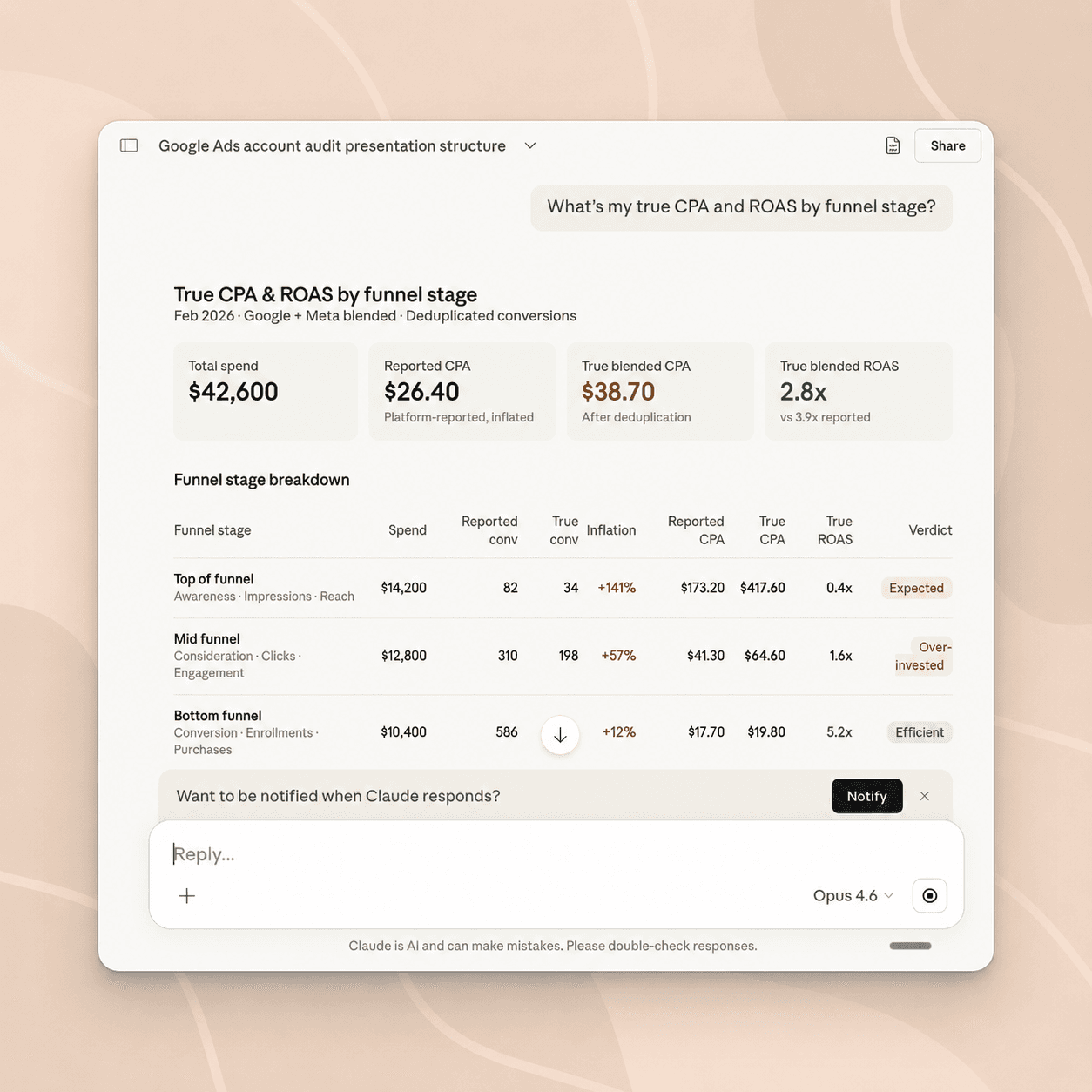
Claude conversation showing a True CPA and ROAS by funnel stage analysis. Adsyncs blends Google + Meta spend, deduplicates conversions, and exposes which funnel stages are over-invested

True CPA & ROAS by funnel stage

We blend Google + Meta spend and strip double-counted conversions. You see which funnel stages are over-invested and which actually pay back, not the inflated number the platforms report.
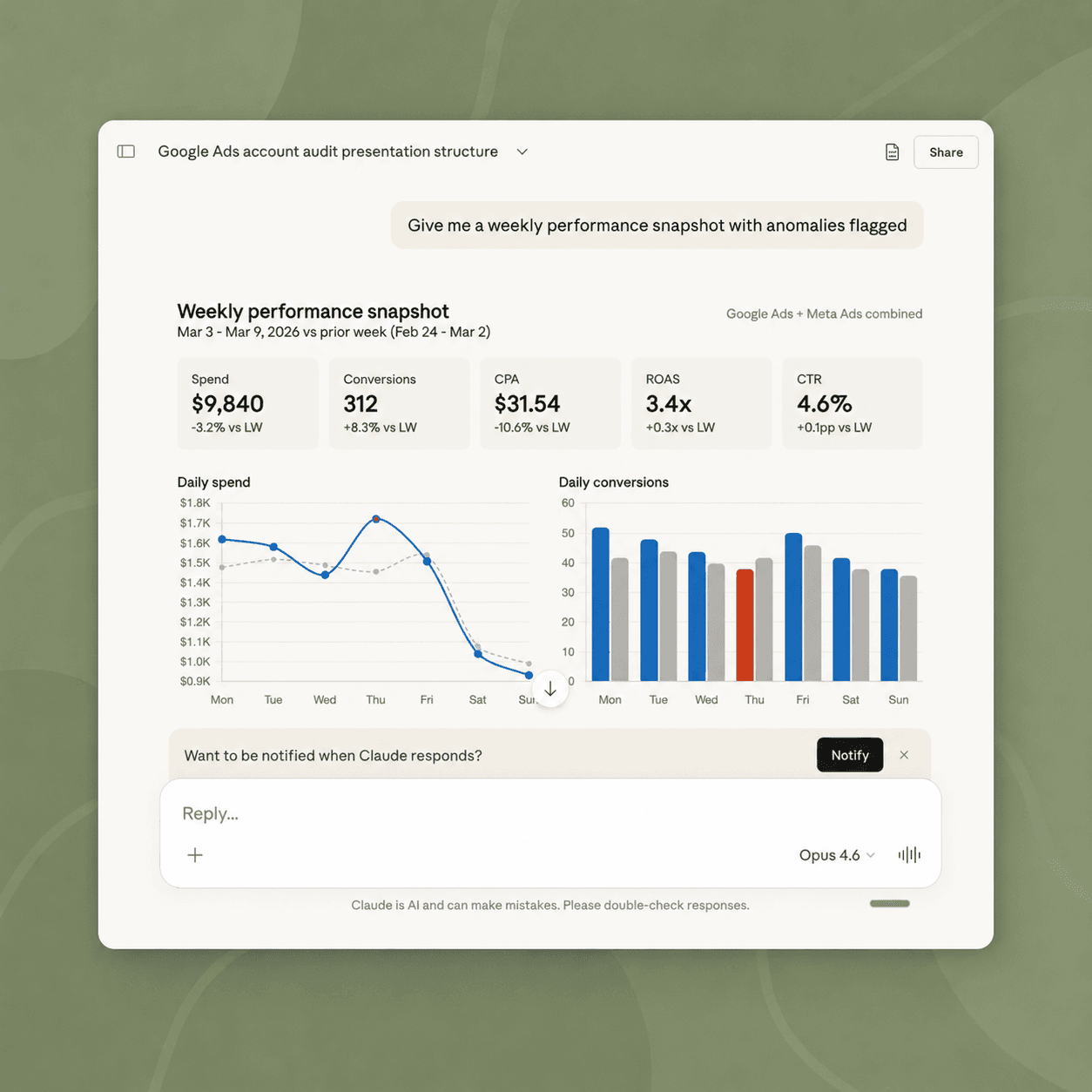
Claude conversation showing a Weekly performance snapshot: spend, conversions, CPA, ROAS, CTR vs. prior week, with Thursday's daily conversion bar flagged as an anomaly

Weekly performance, anomalies flagged

One prompt returns spend, conversions, CPA, ROAS, and CTR vs. the prior week, with the bad days marked, not buried. The team reads it in Slack before standup.

Search-term cleanup

Find long-tail queries burning budget with zero conversions. Claude stages them as negatives; you approve.

Change history

When a number moves overnight, ask Claude what changed in the last 72 hours. Same events as Google’s UI, now queryable.

Keyword research

Generate keyword ideas with CPC, volume, and competition for any seed list, straight from Google’s Keyword Plan.

Budget pacing

Spot campaigns burning daily cap before noon and the ones underspending. Rebalance without a spreadsheet.

Plus a custom-query layer when you need to dig deeper than the built-in tools.

Four moves between a question and an answer.

Adsyncs is the boring middle layer. The interesting part is what Claude does once it’s connected.

  1. Claude · Caldera workspace
    Which campaigns lost the most impression share to budget last week?
    calling google_ads.get_impression_share_diagnostics…
    Step 01

    Ask in plain English

    Open Claude, type the question you’d ask a senior media buyer, and Adsyncs reaches into your live Google Ads account.

    • “Which campaigns lost the most impression share to budget last week?”
    • “Show me the 20 search terms costing the most with zero conversions.”
    • “What changed on the Brand campaign in the last 7 days?”
  2. Reading account4 tools · 1.4s
    list_customers
    1 MCC · 4 accounts
    get_campaign_performance
    12 campaigns
    get_search_terms
    last 30d
    get_change_history
    last 72h
    Step 02

    Read every corner of the account

    We cover everything marketers actually look at, plus a custom-query layer when you need to dig deeper.

    • Multi-account access (MCC + sub-accounts)
    • Performance, impression share, and quality diagnostics
    • Search terms, change history, landing pages
    • Custom queries for anything not in the built-in tools
  3. 3 changes proposedAwaiting approval
    PauseBrand · low-ROAS ad group
    Skip
    Add negative“cheap [brand] tool”
    Skip
    Lower budgetPromo · $80 → $50/day
    Skip
    Step 03

    Act only when you approve

    Writes are off by default. Turn them on, and every change is a proposal: Claude suggests, you confirm. Everything’s logged.

    • Pause or resume campaigns
    • Update budgets with safety limits
    • Push negative keywords back to the account
    • Every change logged with the prompt that requested it
  4. Workspace security
    OAuth refresh tokenEncrypted in vault
    ads.readonly scopeGranted
    ads.write scopeOff
    Workspace allow-list4 accounts
    Audit log127 calls · 7d
    Step 04

    Stay safe inside Google’s rules

    Your sign-in stays encrypted in Adsyncs. Claude never sees your credentials. We follow Google’s rate limits and disclosures.

    • Standard Google sign-in (OAuth)
    • Choose which accounts the agent can see, per workspace
    • Read-only by default; you turn on writes
    • Revoke access any time from the dashboard
200+Google Ads toolsEvery slice of the account, plus raw GAQL.
1Hosted endpointmcp.adsyncs.net, no local daemon to run.
<2sMedian tool callTyped schemas, no roundtrip through a sandbox.

Let Claude run the boring parts of Google Ads.

Free to try. No credit card. Disconnect any time from the dashboard.

5-minute setup · See the quickstart